

In the digital era, speed and seamlessness in Customer Experience (CX) play a decisive role in the success or failure of both B2B and B2C businesses. In the Vietnamese market, Zalo has become a familiar communication channel with tens of millions of daily active users. Most organizations have already established a Zalo Official Account (Zalo OA) to reach, consult with, and support customers.
However, a challenging question arises: How can businesses connect the local communication channel Zalo with an internationally standardized customer management platform such as Salesforce CRM?
Without a well-structured integration solution, businesses will quickly fall into the “data fragmentation trap,” leaving Customer Service (CS) personnel exhausted by countless manual tasks, while management completely loses visibility into the actual quality of service. This article provides a detailed analysis of the current situation, integration architecture, and the entire end-to-end service operation process when combining Zalo OA, Salesforce Service Cloud, and Slack.
1. Operational Pain Points: When Data Is Fragmented Across Multiple Disconnected Applications
Many businesses today operate their Customer Support / Helpdesk departments through fragmented and makeshift processes. When a customer starts messaging through Zalo OA, a series of problems immediately emerges:
The “7 Windows Open at Once” Syndrome
Customer support agents frequently have to switch back and forth between the Zalo web browser, Excel spreadsheets, internal Gmail inboxes, and separate accounting or CRM software. Constantly moving between tabs causes distractions, increases data-entry errors, and extends response times.
Customer Context Blind Spot
When a customer contacts the business for the second or third time, if a different agent is handling the chat session, they have no visibility into the previous interaction history. The customer is forced to explain the entire issue again from the beginning, leading to frustration and lower satisfaction scores.
Risk of Missed Messages and SLA Violations
During peak hours, a flood of incoming Zalo messages without an automated routing mechanism can lead to a situation where some agents are overloaded and unable to respond in time, while others remain idle. Businesses cannot accurately measure First Response Time (FRT) or Average Handling Time (AHT).
Bottlenecks in Cross-Department Collaboration
When dealing with a complex technical incident or commercial dispute, support agents often have to take screenshots of Zalo messages and send them to internal chat groups (personal Zalo, Skype, Viber). Information becomes scattered rather than being centrally stored in the customer’s profile, making future audits and explanations more difficult.
2. Solution Architecture: Zalo OA × Salesforce × Slack
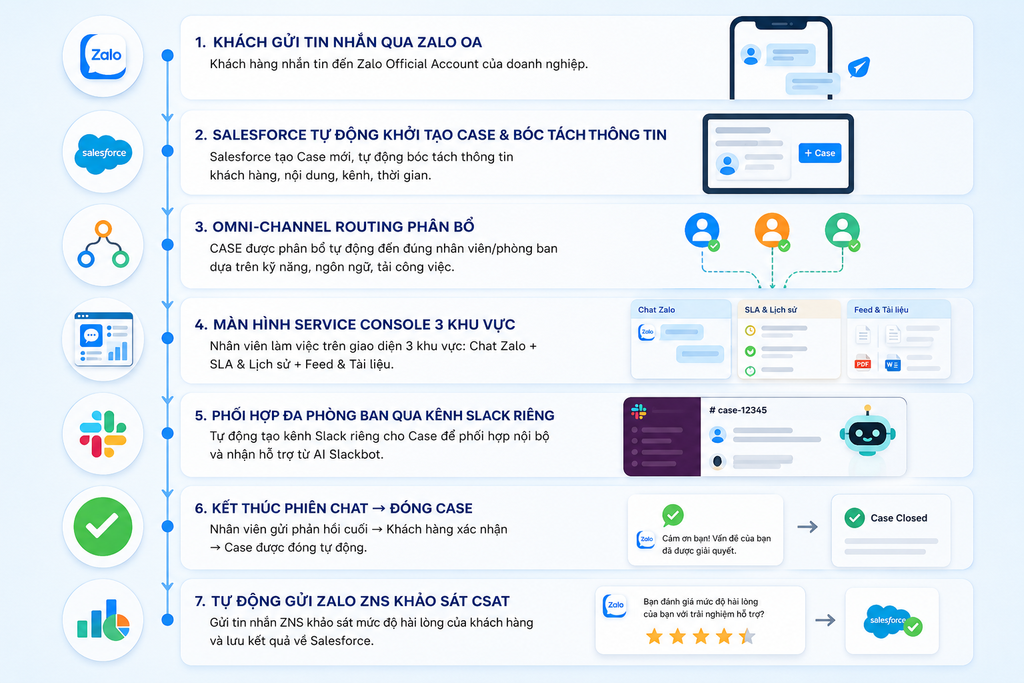
A comprehensive integration solution eliminates all barriers between external communication channels and internal operational systems. All data is connected into a unified flow:
3. The End-to-End Service Handling Journey in Practice
To better understand how the system operates, let’s follow a real-world scenario: A customer submits a technical support request regarding the quotation approval process.
Step 1: Intelligent Intake and Routing (Omni-Channel Routing)
- Automatic Creation: When a customer clicks the “Request Support” button on Zalo OA and sends a message, the backend system automatically creates a Case record in Salesforce Service Cloud.
- Intelligent Routing: Instead of assigning cases randomly, Salesforce’s Omni-Channel Routing mechanism analyzes:
- Agent Presence: Identifies agents who are currently available.
- Workload Capacity: Assigns the Case to the agent with the lowest current workload capacity (e.g., currently handling 4 out of 10 tasks).
- Skills-based Routing: If the request is tagged with a specific language or specialized business skill, the system automatically routes it directly to the relevant specialized team.
- The assigned agent will see a notification pop up in the corner of the Omni-Channel widget and simply click Accept to take ownership of the case.
Step 2: Unified 3-Panel Workspace (Salesforce Service Console)
The agent’s workspace is standardized into a single intuitive screen, eliminating the need to switch between applications:
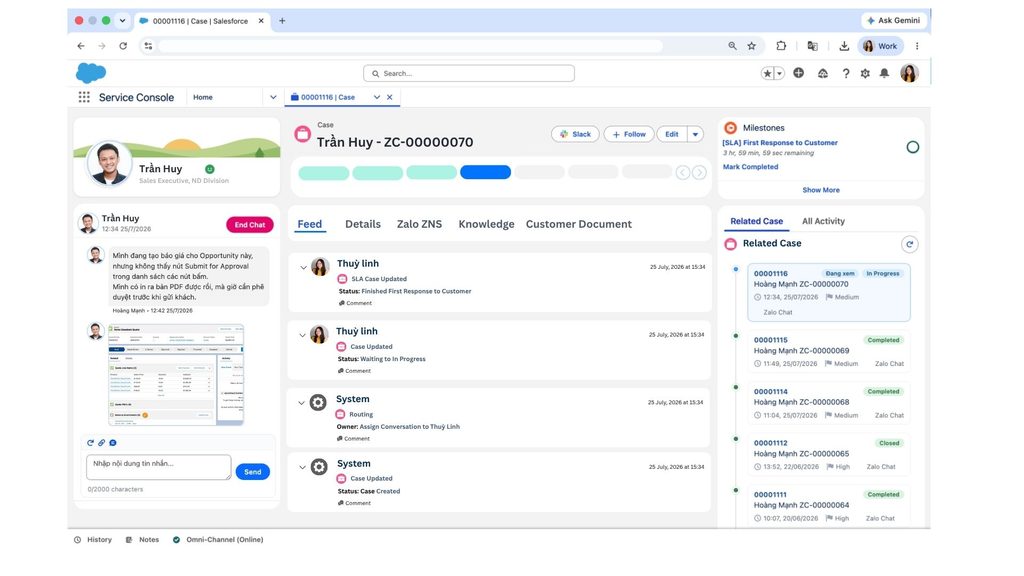
- Left Panel – Zalo Interaction Window:
- Agents can read and message customers directly. All error screenshots and attachments sent by customers through Zalo are displayed clearly here.
- Agents respond directly within the console, and customers receive the replies instantly in their personal Zalo application.
- Right Panel – SLA Commitments & 360-Degree History:
- SLA Milestone Clock: Displays an accurate countdown timer (e.g., First Response: 03 hours 59 minutes remaining). As the deadline approaches, the system automatically changes the warning color from green to yellow/red.
- Interaction History: Lists all previous cases involving the customer. Agents can understand the context within just 5 seconds of scanning the history, completely eliminating repetitive questioning.
- Center Panel – Business Workspace & Quick Reference:
- Feed Tab: Automatically records every key event: time received, assigned agent, and status changes.
- Knowledge Base Tab: Provides an integrated troubleshooting guide. When agents encounter questions about policies or procedures, they can search for keywords and immediately receive step-by-step guidance next to the chat window.
- Customer Documents Tab: A repository for handover documents, technical documentation, and customer-specific user guides.
Step 3: Cross-Department Collaboration with Slack Swarming and AI Assistants
When complex issues arise that exceed the authority of the agent handling the chat:
- Create a Swarm Channel with One Click: The agent clicks the Slack button on the Case toolbar. The system automatically creates a dedicated Slack channel and invites the appropriate technical specialists, team leaders, or product team members.
- No Need for Additional Expensive Salesforce Accounts: Technical team members can view full Case details, discuss solutions, and update data directly from Slack. Data is synchronized bi-directionally with Salesforce in real time.
- Unlocking the Power of AI (Slackbot / Agent AI):
- Staff only need to enter a short command: “Summarize the case and draft an email response to the customer.”
- AI automatically analyzes the entire Zalo chat thread and the discussion within the group, provides a summary of the root cause, and drafts a detailed response for the agent to send back to the customer.
Step 4: Case Closure and Automated Satisfaction Survey via Zalo ZNS
- Once the issue has been fully resolved, the agent clicks End Chat and changes the Case status to Closed.
- Trigger Zalo ZNS (Zalo Notification Service): The Salesforce system automatically sends a ZNS notification containing a Customer Satisfaction (CSAT) survey directly to the customer’s Zalo account.
- The customer rates the service from 1 to 5 stars and leaves a comment. The score is immediately synchronized back to the customer’s Salesforce profile to support employee KPI performance reporting.
4. Real-Time Management Reporting (Real-time Wallboard)
Service Directors and Management can easily monitor all operational activities without waiting for end-of-month consolidated reports:
- Omni-Channel Wallboard: Accurately tracks the number of Cases currently being handled, the source of incoming messages by channel, and the workload capacity of each agent (Agent Capacity).
- Core Performance Metrics: Monitors average response time, case handling time, and SLA compliance rates 24/7.
5. Comparison Table: Manual Operations vs. Salesforce Integration
| Criteria | Manual Zalo Management | Zalo OA × Salesforce Integration |
|---|---|---|
| Work Interface | Scattered across 4–7 windows (Zalo, Excel, Email, CRM) | 100% centralized in a single Service Console screen |
| Request Distribution | Manual assignment, with a high risk of missed messages | Omni-Channel Routing automatically distributes work based on workload and skills |
| SLA Monitoring | Not measurable or calculated manually | Intuitive real-time SLA countdown clock |
| Cross-Department Collaboration | Screenshots sent to personal chat groups | Slack Swarming automatically creates dedicated channels with an AI summarization assistant |
| CSAT Measurement | Survey links sent manually | Automatically sends a 5-star Zalo ZNS survey when the Case is closed |
| Management Reporting | Takes days to consolidate data | Dashboard & Wallboard update automatically in real time |
Explore full content – Watch the youtube video Salesforce X Zalo
6. Conclusion and Implementation Direction
“Zalo is where your customers are. Salesforce is where your team works. The unified solution enables the two platforms to connect seamlessly.”
Integrating Zalo OA with Salesforce is not simply a matter of installing a new technical tool; it is a strategic transformation that helps standardize the entire customer service process. Businesses can simultaneously improve internal productivity, minimize operational costs caused by errors, and deliver a faster, more professional, and consistent support experience to customers.
Start Optimizing Your Customer Service Process Today
Are you looking for a way to standardize your multichannel customer service intake and handling processes?
👉 Book a 30-minute Demo with the expert team at Nimbus Consulting to experience firsthand the Zalo OA × Salesforce operational workflow using your own business data and real-world challenges.
 Ho Chi Minh City Office: 68 Bat Ban, Binh Trung Ward, Ho Chi Minh City