

Salesforce has introduced Quick Pages (Beta), a new feature that allows users to create custom CRM interfaces using natural language. Teams can now access and organize information around their specific needs without relying entirely on IT, while businesses retain control over data access and permissions.
Your Data Is Already in Your CRM. Why Should Accessing It Take So Salesforce Quick Pages: Build Custom CRM Interfaces with AI, No Coding Required
Salesforce has introduced Quick Pages (Beta), allowing users to create personalized data views through natural-language instructions. Teams can organize information around their specific needs without relying entirely on IT, while businesses retain control over access and permissions.
Your Data Is Already in Your CRM. Why Should Accessing It Take So Long?
Businesses may already have the information they need, yet employees often have to wait for an admin to customize a page or export records to Excel whenever they need a view tailored to their work.
The challenge goes beyond waiting time. When information is copied across different tools, keeping it up to date and properly managed becomes increasingly difficult.
Salesforce Quick Pages (Beta) addresses this challenge by allowing users to build tailored interfaces directly within the platform using natural-language requests.
What Is Salesforce Quick Pages?
This AI-powered feature turns simple written instructions into customized, interactive pages without requiring coding skills.
Through Agentforce Cowork or the built-in agent, users simply describe the information they want to see.
For example, a Sales Manager might request:
“Show all opportunities for this quarter, including deal values, sales stages, and expected revenue.”
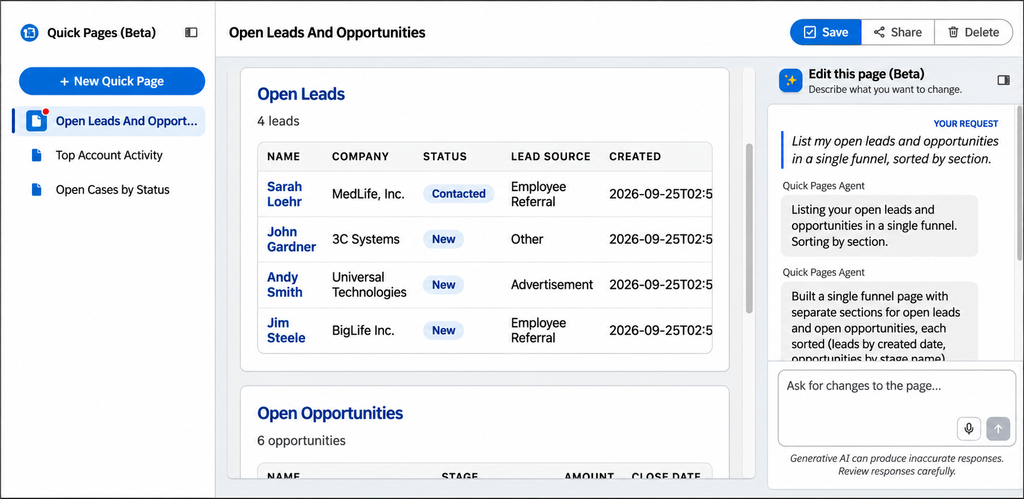
The system then generates a page with relevant tables, charts, and interactive elements. Users can refine it by providing additional instructions.
These views can combine information from multiple objects and fields, including custom fields. They retrieve data directly from the platform and can be shared with colleagues according to their assigned access permissions.
What Business Challenges Does Quick Pages Address?
1. Greater Control Over Data Views, Less Dependence on IT
Instead of waiting for an admin to build each custom interface, authorized employees can create pages tailored to their daily work.
Sales teams can monitor pipelines by stage, Customer Service teams can prioritize open cases, and managers can prepare information for meetings without requesting a separate reporting page.
This allows teams to adjust how they monitor information more quickly while reducing routine interface configuration requests for IT.
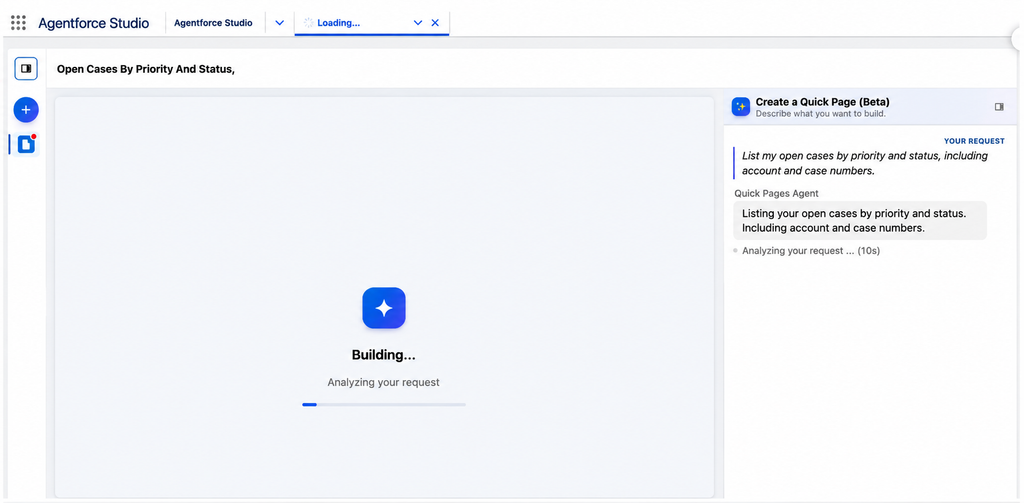
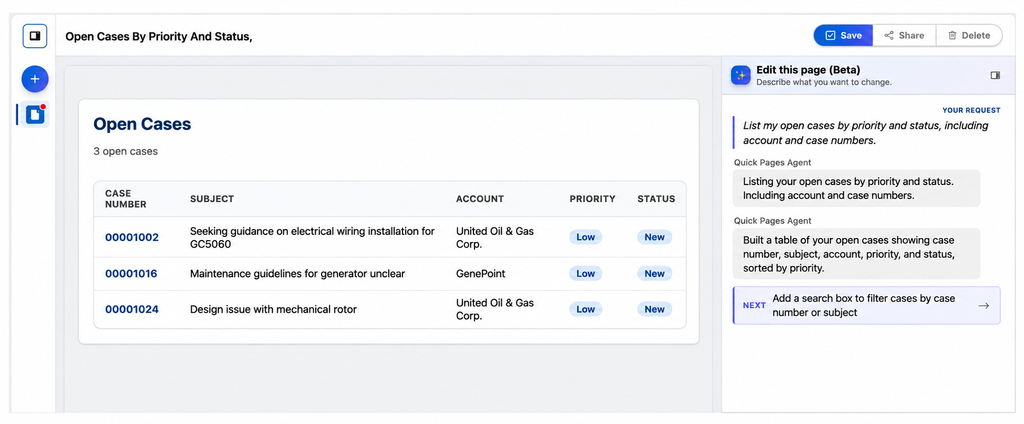
Source: Salesforce Ben. Quick Pages generates data tables from natural language requests, from initial processing to the completed interface.
2. Less Data Fragmentation Across Tools
Exporting CRM data to spreadsheets for custom reporting can quickly create inconsistencies between those files and the original records in Salesforce.
Quick Pages allows users to create new data views directly from Salesforce, reducing the need to copy information into external tools simply to change how it is displayed.
As a result, businesses can reduce situations where different teams rely on different versions of the same data for monitoring or performance reviews.
3. Flexibility for Users, Control for IT
Quick Pages follows Salesforce’s existing security model. Users can only access data they are already authorized to view.
Salesforce admins remain in control of who can create, view, and manage Quick Pages. Creating a new page also does not modify the organization’s existing metadata or application structure.
This allows businesses to accommodate different teams’ data needs while IT continues to manage access permissions and system security.
What Businesses Should Know Before Getting Started
Quick Pages is currently in Beta and comes with several limitations.
The feature is read-only, meaning users cannot create, edit, or delete CRM records directly through Quick Pages. It also does not currently support Data 360, Salesforce Files, CMS, or external data queries through APIs.
Businesses must use a supported Salesforce edition and meet the necessary platform, AI configuration, and user permission requirements.
During the Beta period, Salesforce is not charging for AI usage in Quick Pages. However, this pricing policy may change when the feature becomes generally available.
Given these limitations, businesses should start with a few specific data visualization needs, verify system compatibility, and evaluate the results before expanding adoption.
Nimbus Consulting’s Perspective: A Better Interface Doesn’t Automatically Lead to Better Decisions
Quick Pages makes it easier to create CRM interfaces, but a visually clear dashboard does not necessarily provide reliable information.
For example, if pipeline data is not consistently updated or different teams use different criteria to define sales stages, AI may generate a well-organized report without resolving the underlying data inconsistencies.
At Nimbus Consulting, we believe the real question is not simply how quickly an interface can be created, but whether the data it presents is accurate enough to support sound business decisions.
That is why adopting AI should go hand in hand with data standardization, process design, and access management in Salesforce. These foundations help businesses gain more value from technology rather than simply adding another tool to their operations.
Get More Value from Salesforce with Nimbus Consulting
Already using Salesforce but struggling to get the most out of your CRM data?
Connect with Nimbus Consulting to assess your current Salesforce environment, identify opportunities for improvement, and explore AI solutions that fit your business needs.
Hotline: (+84) 812 014 918
Email: info@nimbus-consult.vn
Ho Chi Minh City Office: 68 Bat Nan Street, Binh Trung Ward, Ho Chi Minh City, Vietnam
Hanoi Office: 12th Floor, Vinafor Building, 127 Lo Duc Street, Hai Ba Trung Ward, Hanoi, Vietnam



 Ho Chi Minh City Office: 68 Bat Ban, Binh Trung Ward, Ho Chi Minh City