

Businesses today rely on multiple platforms to manage customer relationships, coordinate teams, analyze performance, and automate daily operations. However, when these systems operate independently, information becomes fragmented, workflows become disconnected, and employees spend more time switching between applications than focusing on meaningful work.
The Salesforce ecosystem offers an approach to addressing this challenge by connecting customer relationship management, collaboration, data analytics, and artificial intelligence within a more integrated business environment.
Rather than treating each application as a standalone tool, businesses can build a connected ecosystem in which information flows across departments, teams collaborate more effectively, and AI supports decisions and everyday workflows.
But what exactly is the Salesforce ecosystem, what are its key components, and how can businesses make the most of it?
1. What Is the Salesforce Ecosystem?
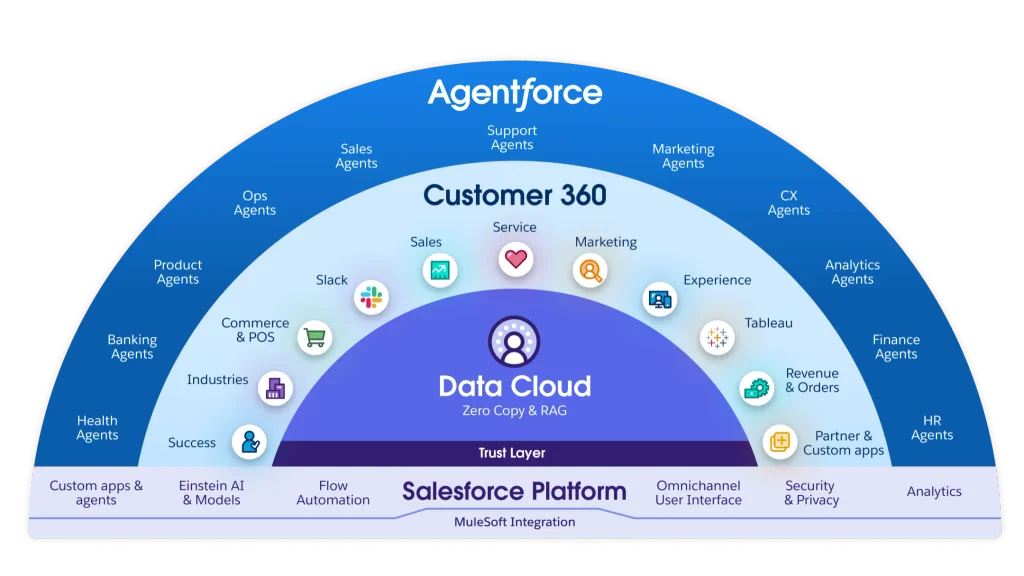
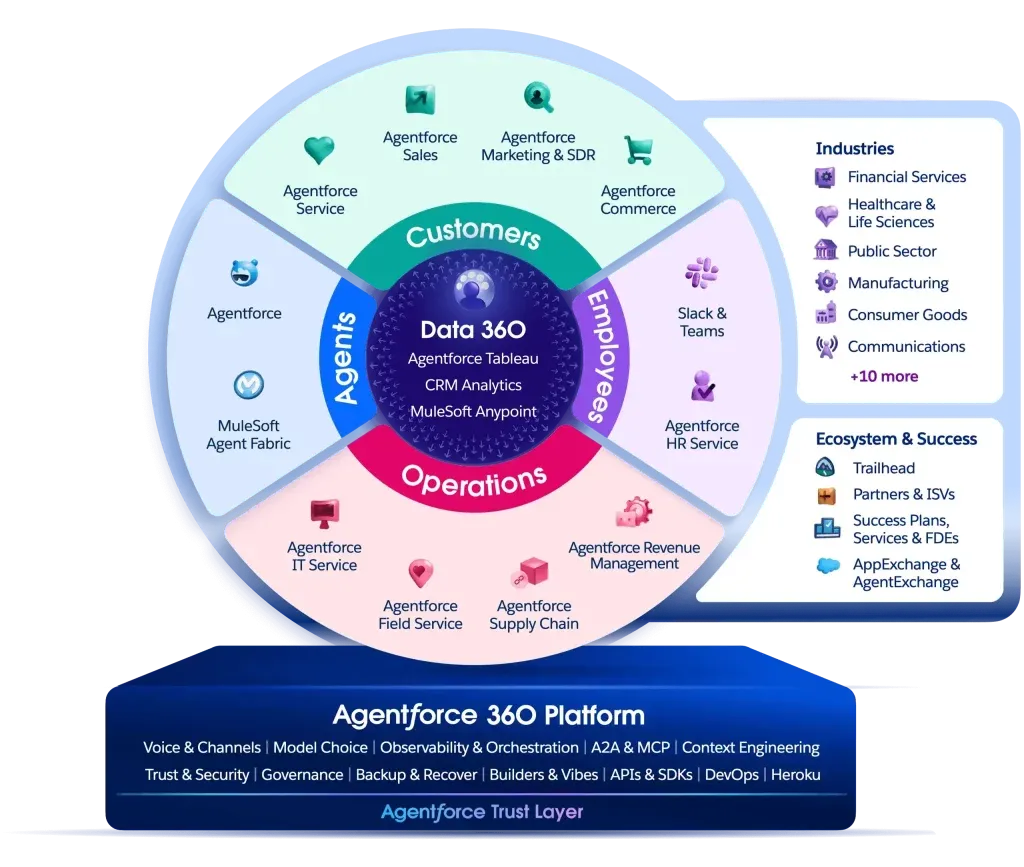
The Salesforce ecosystem is a collection of cloud-based platforms, applications, and technologies designed to help businesses manage customer relationships, connect teams, unify data, analyze business performance, and automate processes.
At its core is Salesforce CRM, which provides a centralized view of customer information and interactions. Around this foundation, businesses can connect different Salesforce products and complementary platforms to support various functions across the organization.
Some key components include:
- Sales Cloud: Supports sales activities, lead management, opportunity tracking, and customer relationship management.
- Service Cloud: Helps customer service teams manage cases, service requests, and customer support interactions.
- Marketing Cloud: Supports customer engagement through marketing automation and personalized communications.
- Slack: Connects people, conversations, applications, and workflows to improve team collaboration.
- Tableau: Turns business data into visual insights that support analysis and decision-making.
- Data 360: Helps unify and activate customer and business data across different sources.
- Agentforce: Enables businesses to build and deploy AI agents that can assist with tasks and business workflows.
Each platform addresses a different business need. Their value becomes greater when they are connected and configured to work together.
2. Why Do Businesses Need Connected Platforms?
As businesses grow, their technology environments often become more complex. Sales teams use CRM systems, marketing teams manage campaign platforms, finance teams work with accounting software, and employees coordinate through email and messaging applications.
Having multiple tools is not necessarily a problem. The challenge arises when those tools cannot exchange information effectively.
2.1. Fragmented Data Creates Incomplete Customer Views
Customer information may be stored across CRM systems, spreadsheets, email platforms, customer service tools, and other databases.
Without effective integration, employees may need to search across multiple systems to understand a customer’s history, current status, or previous interactions.
This makes it difficult to maintain consistent customer information and can slow down responses across departments.
A connected ecosystem helps bring relevant information together, giving teams a more complete view of customers and business activities.
2.2. Disconnected Workflows Slow Down Collaboration
A sales opportunity may require input from sales, finance, customer service, and management. However, if each department works in a separate system, information often has to be shared manually through emails, spreadsheets, or individual messages.
This creates unnecessary handoffs and increases the risk of delays or missed updates.
Connecting business applications with collaboration platforms such as Slack can help teams discuss work in context, receive relevant notifications, and coordinate next steps without constantly switching between tools.
2.3. Limited Data Visibility Makes Decisions More Difficult
Business data is valuable only when decision-makers can access and understand it.
When information is scattered across different platforms, management may struggle to consolidate reports, compare performance, and identify emerging trends.
Integrating data sources and using analytics platforms such as Tableau can help transform disconnected information into meaningful business insights.
2.4. Manual Tasks Limit Productivity
Employees often spend significant time on repetitive activities, including updating records, preparing reports, transferring information, and following up on routine requests.
These tasks may appear small individually, but they can consume substantial working time across an organization.
Automation and AI can help reduce repetitive work, allowing employees to focus on customer relationships, problem-solving, and higher-value activities.
3. Key Components of the Salesforce Ecosystem
The Salesforce ecosystem includes multiple products that support different stages of business operations. Understanding their roles helps businesses identify which capabilities are relevant to their needs.
3.1. Salesforce Sales Cloud – Managing the Sales Journey
Sales Cloud helps businesses manage sales activities from lead generation to opportunity management and deal closure.
Key capabilities include:
- Lead and contact management.
- Account and opportunity tracking.
- Sales pipeline visibility.
- Sales forecasting.
- Sales activity management.
- Workflow automation.
By centralizing sales information, Sales Cloud gives sales representatives and managers a clearer view of customer relationships and pipeline performance.
For example, when a sales representative updates an opportunity, the relevant information can be made available to managers and other authorized teams. This helps improve visibility and coordination throughout the sales process.
3.2. Salesforce Service Cloud – Improving Customer Service
Service Cloud supports customer service operations by helping businesses manage customer requests, service cases, and support activities.
Its capabilities can help organizations:
- Track and manage customer cases.
- Organize service requests.
- Support customer communication across channels.
- Automate service processes.
- Monitor service performance.
When Service Cloud is connected with customer and sales data, service teams can access more relevant context when assisting customers.
This helps create a more consistent customer experience across sales and support interactions.
3.3. Salesforce Slack – Connecting Teams and Workflows
Slack is a collaboration platform that brings conversations, applications, and work activities into one shared environment.
Within the Salesforce ecosystem, Slack can connect employees with business information and workflows, helping teams collaborate more effectively.
For example:
- Sales teams can receive updates about important opportunities.
- Customer service teams can coordinate on complex cases.
- Managers can follow relevant business activities.
- Employees can collaborate through channels organized around projects, customers, or departments.
When integrated with Salesforce, Slack can help bring conversations closer to the business processes they support.
Instead of relying entirely on email exchanges or manually sharing updates, teams can communicate and take action with relevant information available in their collaboration environment.
3.4. Tableau – Turning Data into Business Insights
Tableau is a data analytics and visualization platform that helps businesses explore information and communicate insights through interactive dashboards.
It can connect data from different sources and present key performance indicators in a format that is easier to understand.
Common business applications include:
- Sales performance analysis.
- Revenue and pipeline monitoring.
- Customer behavior analysis.
- Operational performance tracking.
- Management reporting.
For decision-makers, Tableau helps turn business data into a clearer picture of what is happening across the organization.
When supported by reliable and well-integrated data, analytics can help leaders identify trends, monitor performance, and make more informed decisions.
3.5. Data 360 – Connecting Data Across the Business
Data 360 helps businesses bring customer and business data together from different sources.
In many organizations, customer information is distributed across CRM systems, websites, commerce platforms, service applications, and other databases.
Data 360 supports the process of unifying this information so businesses can build a more connected understanding of their customers.
This can help organizations:
- Consolidate customer information from multiple sources.
- Improve customer data accessibility.
- Support more relevant customer experiences.
- Provide a stronger data foundation for analytics and AI.
- Activate data across connected business applications.
A more unified data environment also helps reduce the limitations created by isolated databases and disconnected systems.
3.6. Agentforce – Bringing AI into Business Workflows
Agentforce enables businesses to build and deploy AI agents that can assist with tasks, interact with information, and support business processes.
Rather than using AI only as a standalone chatbot, organizations can incorporate AI agents into workflows where they can access relevant business context and perform defined actions within configured permissions.
Potential applications include:
- Supporting customer service requests.
- Assisting sales teams with customer information.
- Helping employees find relevant business knowledge.
- Supporting routine operational tasks.
- Automating parts of structured workflows.
The effectiveness of AI agents depends on the quality of business data, workflow design, system integration, and access permissions.
This is why AI initiatives should not be considered separately from the broader technology environment. A connected ecosystem provides a stronger foundation for applying AI in practical business scenarios.
4. How Does the Salesforce Ecosystem Work Together?
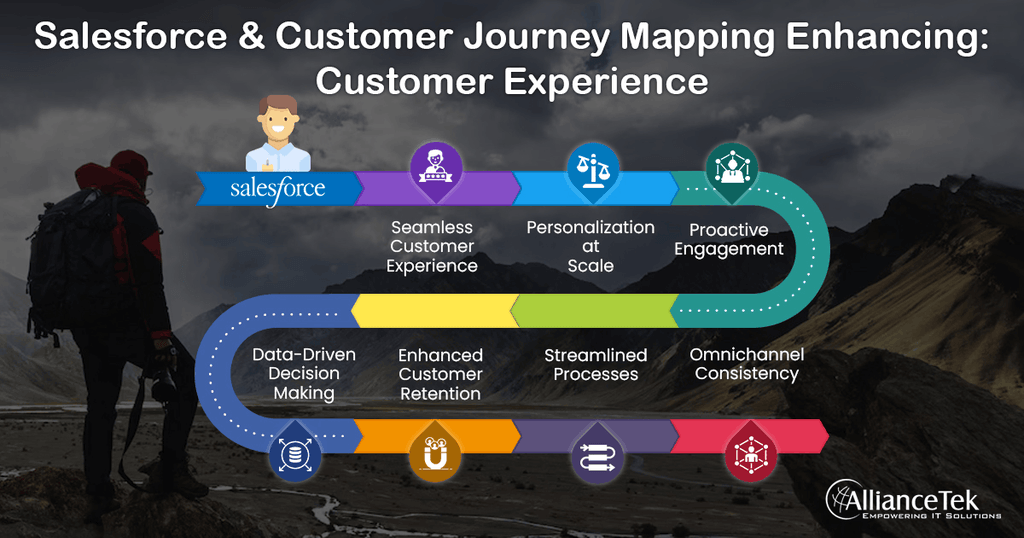
The value of the Salesforce ecosystem does not come from simply owning multiple software licenses. It comes from connecting the right platforms to support business processes across departments.
Consider a typical customer journey.
Step 1: Capture and Manage Customer Information
A potential customer interacts with a business through a website, marketing campaign, or other communication channel.
Relevant information can be collected and managed within connected customer data and CRM platforms.
Sales teams can then access the information needed to understand the prospect and manage the sales opportunity.
Step 2: Coordinate Sales Activities
Sales representatives use Sales Cloud to track leads, update opportunities, manage customer interactions, and monitor deal progress.
When collaboration is required, teams can use Slack to discuss opportunities, share updates, and coordinate next steps.
This helps reduce communication gaps between employees and departments.
Step 3: Support Customers After the Sale
Once a deal is closed, customer service teams may need to provide onboarding, technical support, or ongoing assistance.
Service Cloud helps organize customer requests and track service activities, while relevant customer information can support more contextual interactions.
Step 4: Analyze Business Performance
Business data from connected systems can be used to monitor sales performance, customer service activities, and operational indicators.
With Tableau, decision-makers can access dashboards and reports that help them understand performance and identify areas for improvement.
Step 5: Apply AI to Support Daily Operations
With the right data foundation and integrations, Agentforce can support selected tasks and workflows.
AI agents may help employees retrieve information, respond to routine requests, or complete defined actions within approved business processes.
Across these stages, each platform plays a specific role while contributing to a more connected business journey.
The exact architecture will depend on the organization’s processes, existing systems, data structure, and business priorities.
5. What Should Businesses Consider Before Building a Salesforce Ecosystem?
Implementing multiple platforms at once is not necessarily the best approach. Businesses should first understand their current environment and determine which capabilities will deliver the greatest value.
5.1. Start with Business Objectives
Before selecting software, businesses should identify the outcomes they want to achieve.
For example:
- Improve sales pipeline visibility.
- Reduce manual customer data entry.
- Connect sales and customer service teams.
- Improve management reporting.
- Automate repetitive operational tasks.
- Apply AI to specific business workflows.
Clear objectives help organizations avoid investing in tools that do not address their actual needs.
5.2. Review Existing Systems and Data
Businesses should assess the applications currently in use, where important data is stored, and how information moves between departments.
This review helps identify integration requirements, duplicated data, disconnected workflows, and potential system limitations.
It also provides a foundation for defining how Salesforce should fit into the existing technology environment.
5.3. Prioritize Integration and Data Quality
Connecting applications is only one part of building an effective ecosystem.
Data must also be accurate, consistent, and structured appropriately.
Before implementing integrations, businesses should consider:
- Data ownership across departments.
- Data duplication and inconsistencies.
- Integration methods and system compatibility.
- User access and security permissions.
- Data governance and maintenance responsibilities.
Without reliable data, even well-designed dashboards and AI workflows may produce incomplete or misleading results.
5.4. Choose an Implementation Roadmap
A phased approach can help businesses manage implementation complexity and reduce disruption.
For example, an organization may begin by establishing its CRM foundation, then connect collaboration tools, integrate additional data sources, and gradually introduce analytics and AI capabilities.
The roadmap should reflect business priorities, available resources, and the organization’s readiness for change.
5.5. Prepare Employees for Adoption
Technology alone does not guarantee better business performance.
Employees need to understand how new platforms support their responsibilities and how workflows may change after implementation.
Training, process documentation, internal communication, and ongoing support all contribute to successful adoption.
The goal is not simply to introduce more applications, but to make everyday work more connected and effective.
6. How Nimbus Consulting Supports Salesforce Ecosystem Implementation

Building a connected technology environment requires more than selecting individual software products. Businesses need to understand how systems, data, people, and workflows should work together.
Nimbus Consulting supports businesses in consulting, implementing, integrating, and optimizing Salesforce-related solutions based on their operational needs.
Our services include:
- Software Consulting: Helping businesses identify suitable platforms and solutions based on their business objectives.
- System Implementation: Supporting the implementation and configuration of systems to align with business processes.
- Platform Integration: Connecting Salesforce and other business applications to improve information flow and collaboration.
- Business Process Optimization: Reviewing workflows and identifying opportunities to improve efficiency through technology.
By approaching technology from a business-process perspective, Nimbus Consulting helps organizations move beyond isolated software deployment toward a more connected operating environment.
Whether a business is starting its CRM journey, improving an existing Salesforce environment, or exploring the practical use of AI, defining the right implementation roadmap is an important first step.
7. Building a More Connected Business with Salesforce
The Salesforce ecosystem provides businesses with a range of capabilities to manage customer relationships, connect teams, unify data, analyze performance, and apply AI across business workflows.
However, the real value does not come from implementing every available platform. It comes from identifying the right combination of technologies and connecting them around clear business objectives.
With a well-designed ecosystem, organizations can reduce information silos, improve collaboration, gain better visibility into business performance, and create a stronger foundation for AI adoption.
For businesses looking to make their technology environment more connected and effective, the journey begins with understanding existing processes and defining how each system should contribute to the bigger picture.
Contact Nimbus Consulting to explore how Salesforce solutions and platform integration can support your business transformation.


 Ho Chi Minh City Office: 68 Bat Ban, Binh Trung Ward, Ho Chi Minh City