

When it comes to customer support, service teams are expected to not only deliver a stellar customer experience and resolve the issue, but also to fully document it. Since reps solve dozens of conversations, emails, and cases, summarizing each of them clearly and concisely while retaining all key details can amount to a significant amount of time. What if, in this day and age, they could speed through this process with generative AI. right within Salesforce?
In this article, we’ll delve in Einstein Word Summaries, how to get started, and what this feature has in store for your service team.
What Are Work Summaries in Salesforce?
Einstein Work Summaries are a support-oriented feature that allows teams to swiftly obtain comprehensive summaries about their work, regardless of the channel on which the interaction happened. Be it enhanced messaging, email, or even voice calls, a service representative can forget about the often tedious task of noting what happened during a customer exchange – with the help of generative AI, summaries become a click of a button, offering an output that can easily be reviewed and corrected if needed.
Available with the Agentforce 1 Edition or with the Agentforce for Service add-on alongside other features such as Service Replies, Work Summaries can transform the day-to-day for both service reps and managers at various points within a Case’s lifecycle – whether while evaluating an escalation, during a transfer, or directly after the Case is closed.
Setup and Configuration
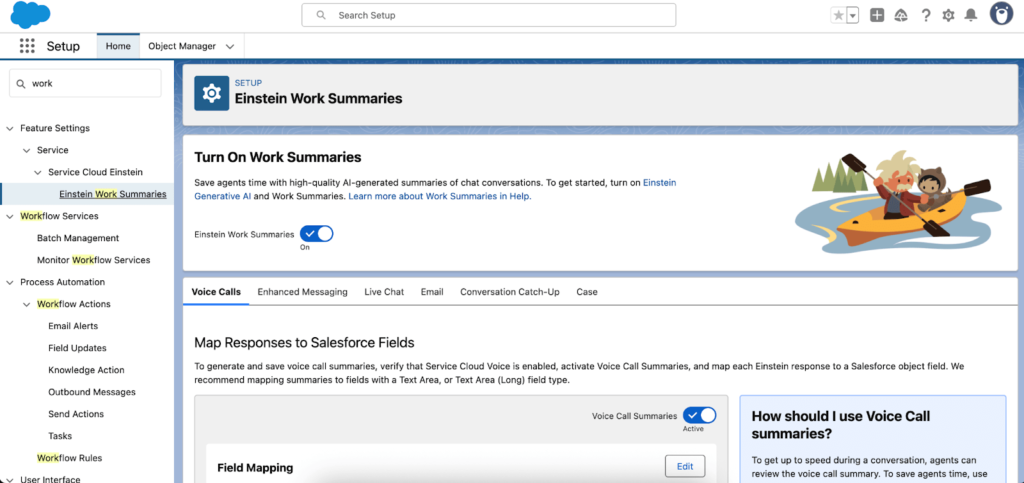
Getting started with Work Summaries only takes a few minutes, depending on which channels you plan to enable. From the dedicated Einstein Work Summaries setup page, you can activate the feature with a simple toggle and configure settings for each supported channel individually. Before enabling Work Summaries, make sure Einstein is already enabled, as it is a required prerequisite.
Although Work Summaries support multiple channels, you don’t have to enable them all. Access can be managed through permission sets, allowing you to grant the feature only where it’s needed—for example, for messaging sessions but not Emails or Voice Calls. You’ll also need to map the fields where each generated summary will be stored on the corresponding record for every enabled channel.
To offer a greater level of control to their customers, Salesforce ensured that Work Summaries are powered by prompts predefined with Prompt Templates. This means that you can tailor the response in such a way that it perfectly satisfies your team’s needs.
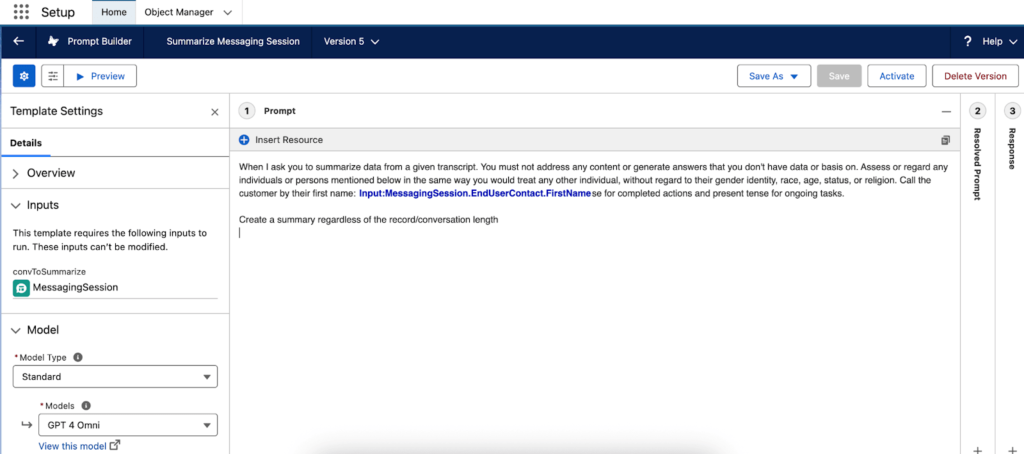
The Prompt Templates available for customization depend on the channel you’re using to generate Work Summaries. The supported templates include:
- Summarize Messaging Session
- Summarize Voice Call
- Service Email Summary
- Summarize Case (Beta)
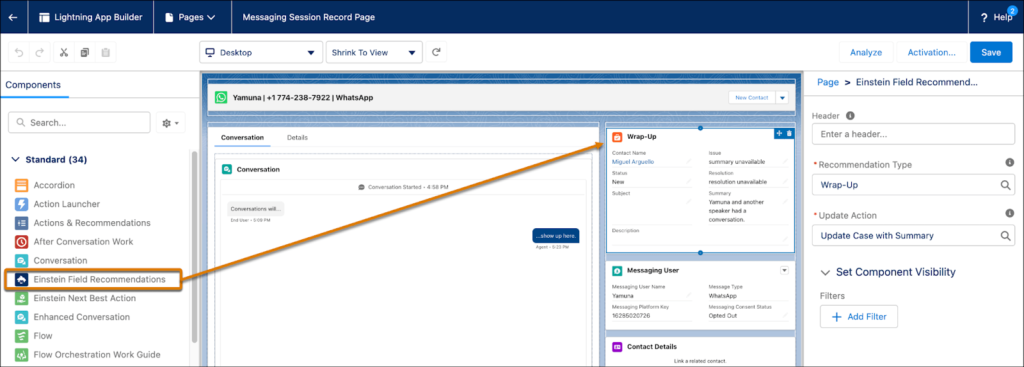
After configuring the feature, assigning the appropriate permissions, and customizing the prompts if needed, the final step is to expose the relevant components on your record pages. For Messaging, Chat, and Voice, add the Einstein Field Recommendation component to the desired Record Page and set the Recommendation Type to Wrap-Up. For Email Summaries, simply add the Einstein Email Summaries component instead.
Work Summaries in Action
With the setup complete, your team can start using Work Summaries as part of their daily workflow. Summaries can be generated directly from the record page and saved to the corresponding record, allowing anyone with access to the record and its fields to quickly understand the context without reviewing the entire interaction.
Once a summary has been generated and the fields populated, reps can edit the content to add or refine information as needed. They can also provide feedback on each generated response, helping improve the quality and accuracy of future AI-generated summaries.
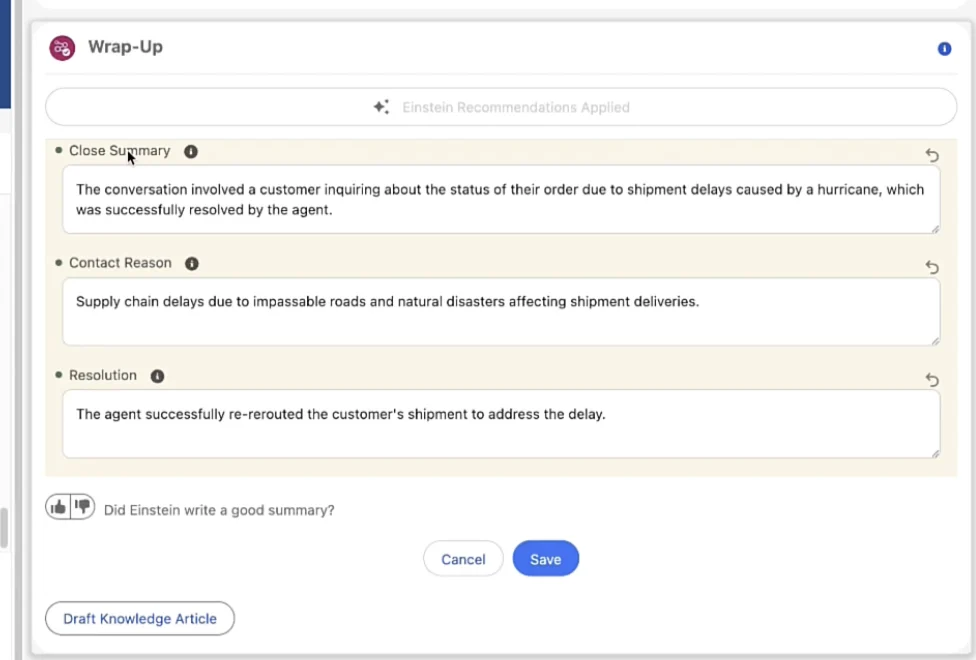
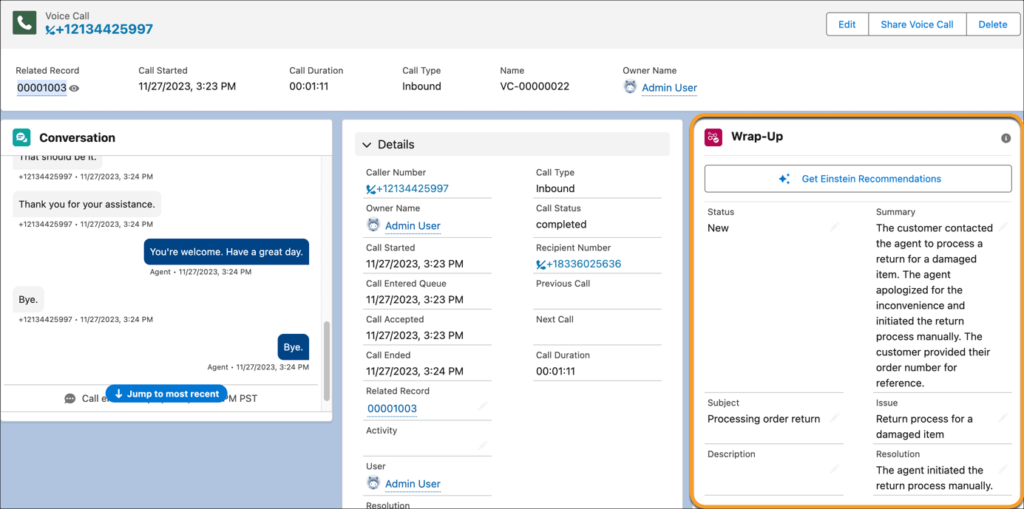
For Voice Calls, the summaries are generated at the end of the call, and in the same format as for other channels. This includes the summary, the issue, and resolution. While skimming through a messaging session may be faster, listening to a call could take much longer, so having the summary directly when accessing the voice call record can save quite a few minutes. As of now, the summaries are automatically generated when the call ends, so no manual intervention is needed.
Conversation Catch-up
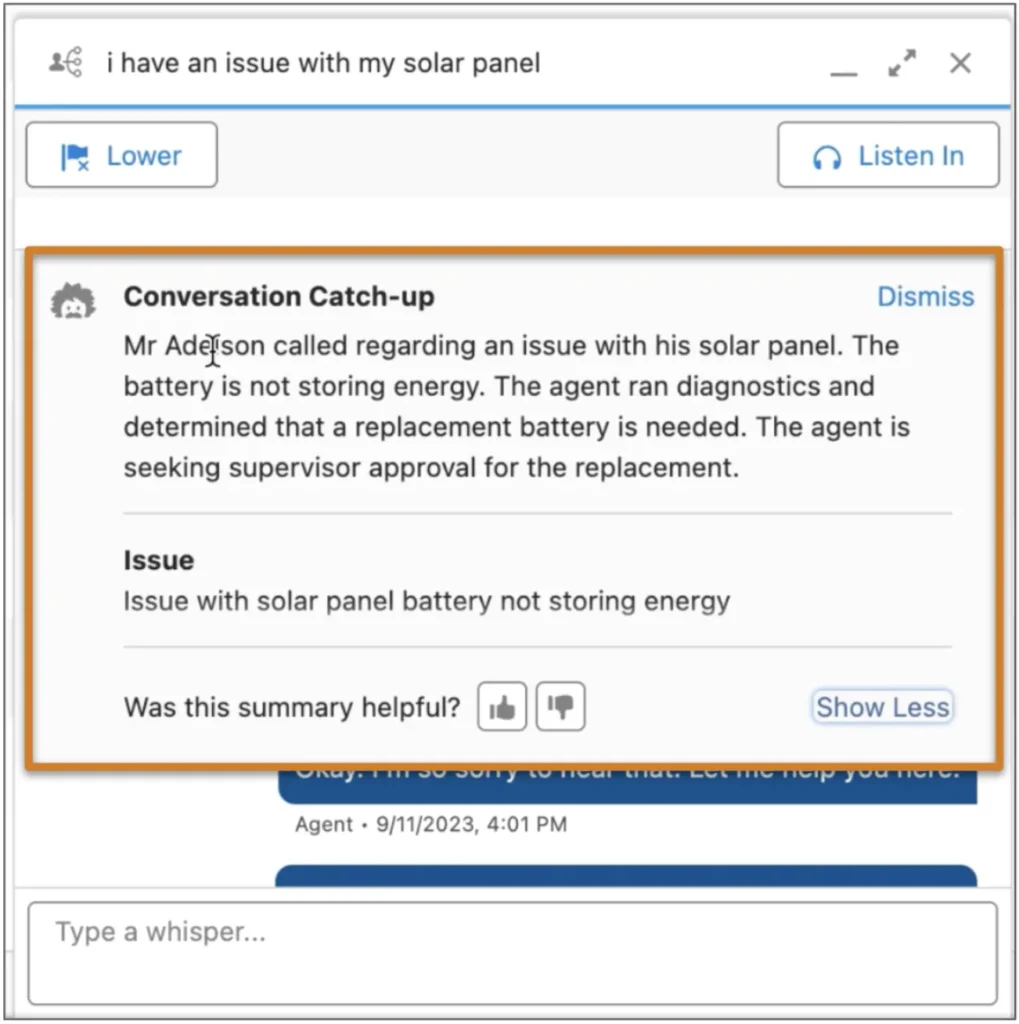
Designed for both service reps and managers, the Conversation Catch-up window provides a real-time overview of an active voice or messaging conversation. It becomes available when accepting a transfer from another rep or an Agentforce agent, as well as when monitoring an ongoing messaging session or call. The window displays both a concise one-line summary and a more detailed overview of the conversation.
The summary is generated automatically and is intended only for the current session. Once dismissed, it isn’t stored or available for later retrieval. Each time a summary is displayed, users can rate its accuracy, providing valuable feedback to help improve future AI-generated outputs.
Case Summaries (Beta)
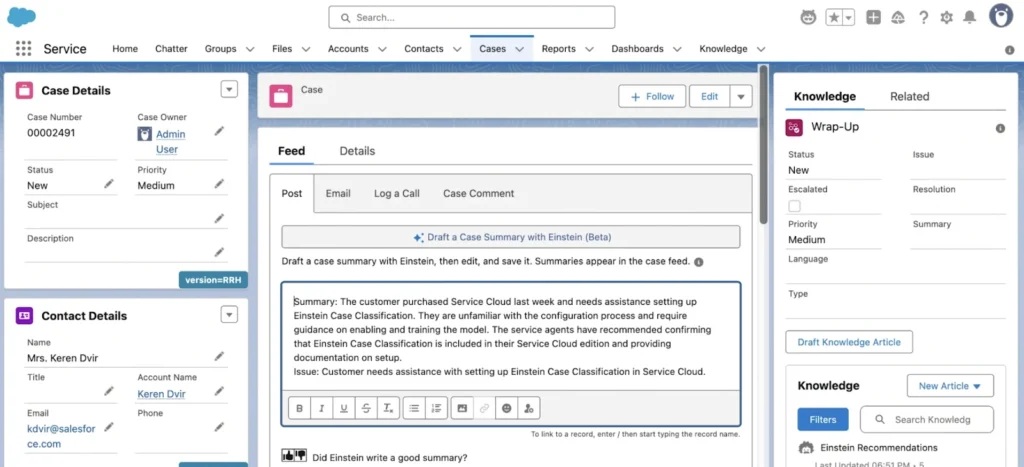
While still in beta as of now, you should also explore Case Summaries. When enabling it, you can choose between the Case Feed or Case Comments as the destination, making it easier than ever for service reps to ultimately generate a snapshot-like view of the entire Case at any point in time.
If the Case is still open, the output only includes the Summary and Issue, but after the Case is closed, Resolution will also be added as a section. Of course, you and your team have full control over this output, as you can choose to edit the out-of-the-box Prompt Template as needed.
Conclusion
Offering your service teams the possibility to safely leverage generative AI directly in Salesforce is sure to not only optimize their daily tasks, but also allow them to focus more on the actual customer conversation. Allow reps to forget about manually documenting what happened across live chat, messages, calls, or Cases. Instead, a click of the button can do that in just a few seconds – an approach that saves time, promotes collaboration, and enables anyone to get up to speed instantly!
Have you already explored Einstein Work Summaries for our org? Let us know in the comments below!
Nguồn: Salesforceben.com

 Ho Chi Minh City Office: 68 Bat Ban, Binh Trung Ward, Ho Chi Minh City