A harsh reality is that only 26% of organizations successfully implement and adopt CRM systems. The majority struggle with costly mistakes that can delay results, increase expenses, and reduce user adoption. The good news is that most of these challenges are entirely avoidable, if you start with the right strategy, clear objectives, and a well-defined implementation roadmap from day one.
I. What Is Salesforce CRM?
Salesforce (Salesforce.com, Inc.) is one of the world’s leading software companies, providing Customer Relationship Management (CRM) solutions that help organizations manage customer data, streamline business processes, and execute marketing initiatives without the significant costs associated with building and maintaining proprietary software infrastructure. The company is best known for pioneering the SaaS (Software as a Service) model, delivering cloud-based CRM applications that are accessible, scalable, and continuously updated.
It is no coincidence that Salesforce has been recognized as the world’s No. 1 CRM provider for 12 consecutive years as of 2025. According to IDC’s Worldwide Semiannual Software Tracker 2024, Salesforce holds a 20.7% share of the global CRM market, significantly outperforming its competitors.
This market leadership has further strengthened Salesforce’s position as a Leader in industry analyst evaluations, earning top recognition for its Completeness of Vision – a reflection of the company’s long-term innovation strategy, extensive ecosystem, and ability to anticipate evolving business needs.
Further Reading: Salesforce Named #1 CRM
1. Key Benefits of Using Salesforce CRM
Salesforce CRM delivers significant business value for organizations of all sizes, from small businesses to large enterprises, helping optimize operations and drive sustainable revenue growth.
Centralized and Secure Data Management
All customer information, orders, and transaction histories are stored in a cloud-based platform and updated in real time. This eliminates data silos, reduces the risk of information loss, and provides a reliable foundation for business intelligence and decision-making.
Automation Across Sales, Marketing, and Customer Service
Salesforce helps teams reduce repetitive manual tasks such as sending mass emails, tracking sales pipelines, and scheduling customer follow-ups. As a result, employees can spend more time on high-value activities, including customer engagement, deal closing, and strategic initiatives.
Personalized Customer Experiences
Powered by Salesforce Einstein AI, the platform can analyze customer behavior, predict future needs, and recommend relevant offers or actions. This enables businesses to create tailored engagement strategies for different customer segments and improve overall customer satisfaction.
Accurate Reporting and Revenue Forecasting
Salesforce provides intuitive dashboards and analytics for key business metrics such as conversion rates, customer lifetime value (CLV), and customer retention rates. These insights help business leaders make faster, data-driven decisions and allocate resources more effectively.
A notable example is L’Oréal, one of the world’s leading beauty companies, which leveraged Salesforce to unify customer data and personalize the customer beauty journey. Instead of sending generic mass-marketing emails, the platform uses AI to analyze purchase history and automatically recommend the most suitable beauty products for each individual customer.
As a result, L’Oréal reported a more than 20% increase in customer engagement across major campaigns, contributing to significant growth in its online retail revenue.
2. Key Features of Salesforce
To deliver the business benefits mentioned above, Salesforce is equipped with a comprehensive set of features designed to support organizations across different industries and business models:
Flexible Customization Capabilities
Salesforce can be tailored to match the unique sales processes, workflows, and operational requirements of each organization. Rather than forcing businesses to adapt to rigid software structures, the platform can be configured to support existing business practices and evolving needs.
AppExchange Ecosystem
Salesforce offers access to AppExchange, one of the world’s largest enterprise application marketplaces. Businesses can easily extend platform functionality and integrate Salesforce with thousands of third-party solutions, including Gmail, accounting software, telephony systems, ERP platforms, and other business-critical applications.
Omnichannel Customer Management
Salesforce captures and consolidates customer interactions across multiple channels, including websites, social media, email, live chat, and phone support into a single unified interface.
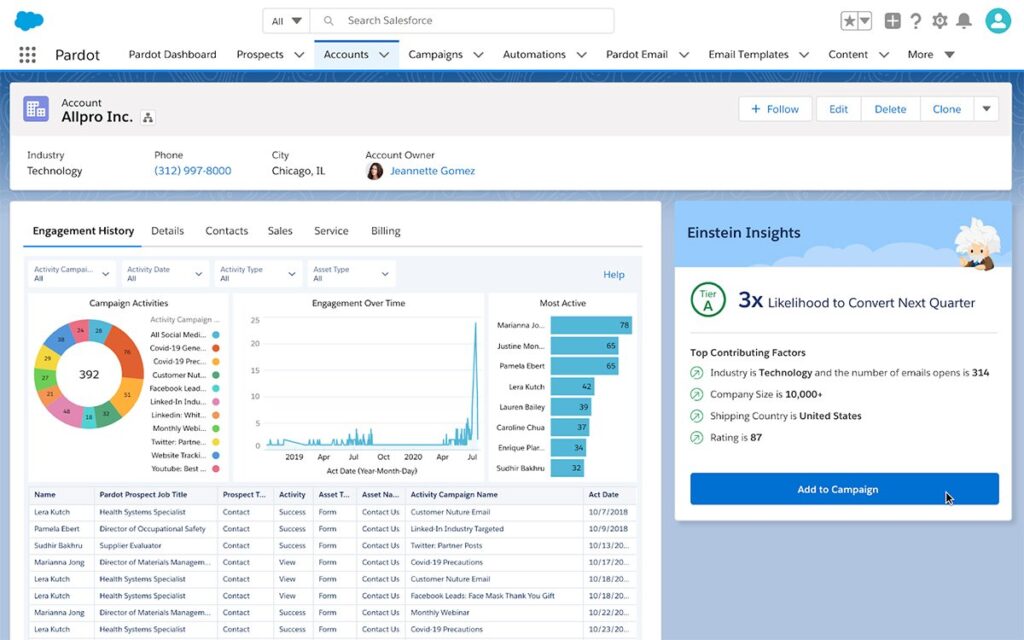
Source: TechTarget
3. Potential Limitations to Consider
3. Potential Limitations to Consider
Although Salesforce is widely recognized as the world’s leading CRM platform, organizations should carefully evaluate several considerations before making an investment decision:
Higher Total Cost of Ownership
Compared to many CRM solutions on the market, Salesforce licensing costs can be relatively high. Businesses may also incur additional expenses for advanced features, integrations, customization, user training, and ongoing support.
Learning Curve for New Users
Due to its extensive functionality and flexibility, Salesforce can be challenging for first-time users. Organizations should plan for structured training and change management initiatives to ensure employees can fully leverage the platform’s capabilities.
Complex Implementation Process
For businesses with sophisticated workflows and operational requirements, implementing Salesforce can be a complex undertaking. Many organizations choose to work with experienced Salesforce consultants or implementation partners to design, configure, and deploy the system effectively while minimizing risks.
II. The 6 Lowest-Risk Steps to Implement Salesforce CRM Successfully
Bước 1: Lập Kế Hoạch
This phase determines up to 80% of a project’s success or failure, yet it is often the most overlooked and superficially executed stage of the entire implementation process.
1. Define SMART Goals (Specific, Measurable, Achievable, Relevant, and Time-Bound).
| Vague Goal | SMART Goal (Measurable) |
| “Improve the sales process” | “Increase the customer conversion rate from 20% to 28% within the next 6 months.” |
| “Provide better customer service” | “Reduce lead response time from 48 hours to 4 hours by Q2.” |
| “Reduce manual work” | “Automate 80% of manual data-entry tasks for the sales team within 3 months.” |
2. Build the Right Implementation Team
A successful Salesforce CRM project requires four key roles working together throughout the implementation process:
Executive Sponsor
A senior business leader who provides executive support, approves budgets, and helps resolve strategic conflicts or organizational roadblocks.
Project Manager
The individual responsible for coordinating the project, managing timelines, tracking progress, and mitigating implementation risks.
Salesforce Administrator (Admin)
A technical specialist who configures, maintains, and manages the Salesforce environment, ensuring the platform operates effectively and meets business requirements.
Key Users
Representatives from departments such as Sales, Marketing, and Customer Service who contribute operational insights, validate business requirements, and participate in user acceptance testing (UAT) to ensure the solution aligns with real-world workflows.
Step 2: Analyze Business Requirements
Don’t buy everything Salesforce offers, invest in what your business actually needs.
A common mistake in CRM projects is implementing too many features that add complexity without delivering meaningful business value. Instead, organizations should map business requirements directly to Salesforce capabilities.
Feature Mapping: Align Business Needs with Salesforce Functionality
- Need to reduce repetitive manual tasks → Use Flow Builder.
- Need greater visibility into business performance → Configure Reports & Dashboards.
- Need automatic lead distribution among sales representatives → Set up Lead Assignment Rules.
- Need more accurate revenue projections → Enable the Forecasting Module.
Tip: This phase is where the project scope should be finalized. Any new requirements introduced after this point should go through a formal Change Request process to prevent scope creep, project delays, and unnecessary implementation costs.
Step 3: Configure and Customize the System
The golden rule at this stage is: “Standardize the process first – customize the system second.”
A. Set Up the Core Foundation
1. Configure Time Zone and Language Settings
These settings directly impact data timestamps, reporting accuracy, and user experience across the organization.
2. Define the Fiscal Year
Choose between a Standard Fiscal Year or a Custom Fiscal Year, depending on your company’s financial reporting structure.
3. Set Up My Domain
Important: Changes to My Domain can affect the entire user interface and user access experience. Thorough testing in a Sandbox environment is strongly recommended before applying changes to production.
4. Customize the User Interface and Branding
Personalize the Salesforce experience using Built-in themes or Custom themes to align the platform with your company’s brand identity and user preferences.
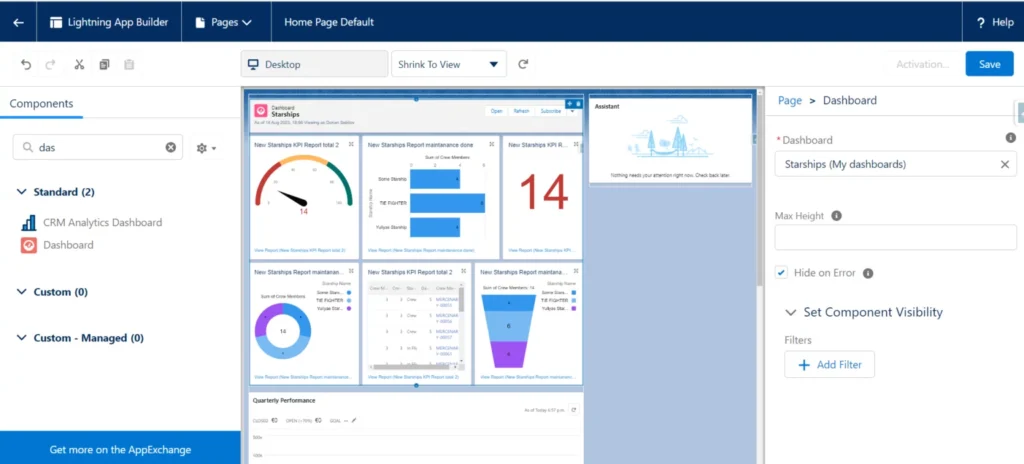
Source: SFApps.info
Further Reading: How to Set Up a Custom KPI Dashboard
B. Build a Four-Layer Security Framework
Salesforce provides powerful access control and security capabilities. Organizations should take full advantage of them by implementing a layered security model:
| Security Layer | Tools Used | Purpose |
| Perimeter Security | Firewall. Session Security | Prevent unauthorized access to the system |
| Identity Management | Multi-Factor Authentication (MFA), Password Policies | Verify user identities and strengthen account security |
| Access Control | Profiles & Permission Sets | Control which features and functions each user can access |
| Data Security | OWD, Role Hierarchy, Sharing Rules | Control which records and data users can view or modify |
Step 4: Data Migration
“If you put bad data into a smart system, you’ll get bad decisions out.”
Step 4: Data Migration
“If you put bad data into a smart system, you’ll get bad decisions out.”
8 Step Data Cleansing and Migration Process
1. Data Assessment
Collect and review all data from existing systems and sources.
2. Data Cleansing
Remove duplicate records, incomplete entries, and outdated information to improve data quality.
3. Data Mapping
Match fields from legacy systems to the corresponding fields in Salesforce.
4. Select the Appropriate Migration Tool
Use Data Import Wizard (for fewer than 50,000 records) or Data Loader (for up to 5 million records).
5. Test Import
Run a pilot migration using approximately 5–10% of the total dataset.
6. Validation and Error Checking
Review import logs and identify any data quality issues or migration errors.
7. Full Data Import
Migrate the complete dataset into Salesforce after successful testing.
8. Reconciliation and Verification
Cross-check record counts and validate data accuracy to ensure all information has been migrated correctly.
Recommended Data Migration Sequence:
Users → Accounts → Contacts → Leads → Opportunities → Campaigns → Activities
Step 5: Testing and Team Training
- Test in a Sandbox Environment: Never perform testing directly in the Production environment. Conduct Unit Test (testing individual features), UAT (User Acceptance Testing) (business user validation), and Performance Testing to ensure the system functions as expected before go-live.
- Develop an Effective Training Strategy
Start by answering the question: “How will this system help employees perform their jobs more effectively?”- Organize training sessions by department, as Sales users typically require different training from Marketing or Customer Service teams.
- Allow employees to gain hands-on experience by practicing in a Sandbox environment.
- Encourage self-paced learning through Salesforce’s free learning platform, Trailhead.
- Provide ongoing support, answer user questions, and distribute training materials and documentation.
Step 6: Go-Live and Performance Measurement
Go-Live Checklist
- Lock the legacy system by switching it to Read-Only Mode.
- Send an official company-wide announcement regarding the system launch.
- Establish a dedicated support team to handle user questions and issues during the first week after go-live.
Measure Success Through Three Key Perspectives
1. Adoption: Measure how effectively users are embracing the new system.
- What percentage of users log in daily?
- Are users consistently entering complete and accurate data?
- Are key business processes being executed within Salesforce?
2. Performance
Evaluate whether the platform is improving operational efficiency.
- Has the sales cycle become shorter?
- Has the opportunity win rate improved?
- Are teams completing tasks more efficiently?
3. Business Impact
Assess the measurable impact on business outcomes.
- How much has revenue increased?
- Has customer acquisition cost (CAC) decreased?
- Are customer retention and satisfaction metrics improving?
III. Five Golden Principles for a Successful Salesforce CRM Implementation
Process First, Technology Second
Salesforce is a powerful business accelerator, but it cannot fix broken or inefficient business processes. Organizations should standardize and optimize their workflows before configuring the system.
Always Use a Sandbox Environment
Every change, customization, or enhancement should be tested in a Sandbox environment before being deployed to Production. This minimizes risk and helps prevent unexpected disruptions.
Prioritize Out-of-the-Box Functionality
Maximize the use of Salesforce’s standard features and best-practice capabilities before considering complex custom development. This reduces implementation costs, simplifies maintenance, and improves scalability.
Strong Executive Sponsorship Is Essential
The Executive Sponsor must actively champion the project, reinforce organizational commitment, and maintain accountability throughout the implementation journey, including the critical go-live phase.
Measure Success from Day One
User behaviors established during the first days and weeks of adoption often become long-term habits. If employees develop incorrect usage patterns early on, it can take months to correct them. Establish clear metrics, monitor adoption closely, and address issues immediately.
IV. Conclusion
Implementing Salesforce CRM has never been a challenge that can be solved with just a few clicks or by simply installing an application. As we have seen, it is a strategic business initiative that requires meaningful investment in budget, time, and commitment from both leadership and end users across the organization.
However, by following the structured six-step implementation framework outlined above, businesses can stay on the right path, gain full control of the platform, and significantly reduce the risk of project failure—the most common obstacle in large-scale software implementations.
Once the system is fully adopted and operating effectively, Salesforce is no longer just another software expense. It becomes a critical business asset that helps unify data, deepen customer understanding, streamline operations, and drive sustainable revenue growth.
👉 Contact Nimbus Consulting today to schedule a business assessment and receive a complimentary Salesforce solution demo tailored to your organization’s needs.
Hotline: (+84) 812 014 918
Email: Info@nimbus-consult.vn